🎟️ 2.2 Booking Experiences
Reserve your spot in seconds through Sweatpals
Overview
Booking through Sweatpals is simple and secure. You can pay via card or use a valid membership if the host allows it.
Booking an Experience (web app)
- Tap an event card from your feed or search results.
- Review event details, date, and location.
- Tap Buy Ticket.
- Choose a Ticket Type or Membership Credit (if available): tap the plus icon '+' next to the ticket to choose the number of tickets to purchase.
- Tap Continue.
- Tap Confirm & Pay to complete payment using Apple Pay, Google Pay, or Credit Card.
- You’ll see a confirmation screen and receive an email receipt.
On the web, if the experience has only one ticket type, is free, or is free for you with your membership, Book now takes you straight to checkout, so you skip choosing a ticket. For a free experience, click Register to finish.
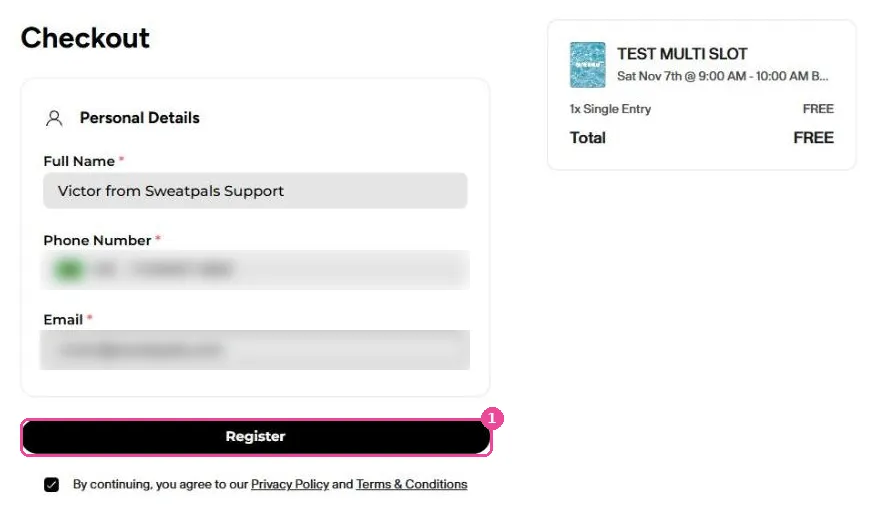
In the app, you still choose your ticket first.
Booking an Experience (mobile app)
- Tap an event card from your feed or search results.
- Review event details, date, and location.
- Tap Choose Ticket.
- Choose a Ticket Type or Membership Credit (if available): tap the plus icon '+' next to the ticket to choose the number of tickets to purchase.
- Tap Checkout.
- Tap Continue
- Tap Confirm & Pay to complete payment using Apple Pay, Google Pay, or Credit Card.
- You’ll see a confirmation screen and receive an email receipt.
Using Promo Codes
- On the payment screen, tap Add Promo Code.
- Enter your code exactly as provided (case-sensitive).
- Tap Apply.
- Your discount appears before checkout.
Booking Appointments
Appointments are 1:1 sessions with a provider, like a trainer or a coach. On the web, the appointment page shows when the appointment runs, where it happens, the price and a Book now button. Under Meet your providers you'll see each provider with their photo, bio and next open times. You'll also find the host's reschedule and refund policy and the available packages.
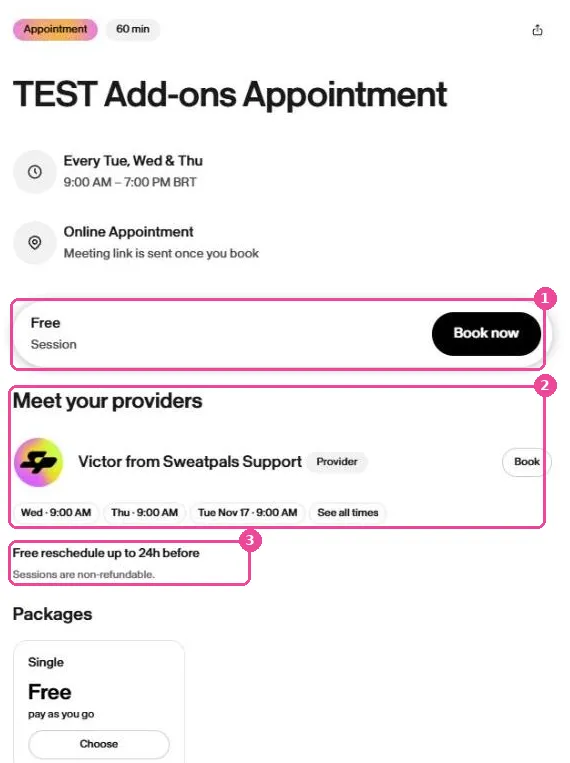
To book an appointment on the web:
- Click Book now. To book with a specific provider, click one of their times or Book next to their name.
- Choose a provider. Any provider (No preference) shows every open time, and you'll be booked with whoever is free then. To see one provider's times, pick them from the dropdown.
- Choose a date. Days with open times have a dot under them.
- Choose a time.
- Choose your package.
- Check the summary (for example, First session with your provider at 9:00 AM, Nov 11) and click Continue. You won't be charged yet.
- Complete the checkout to confirm your booking.
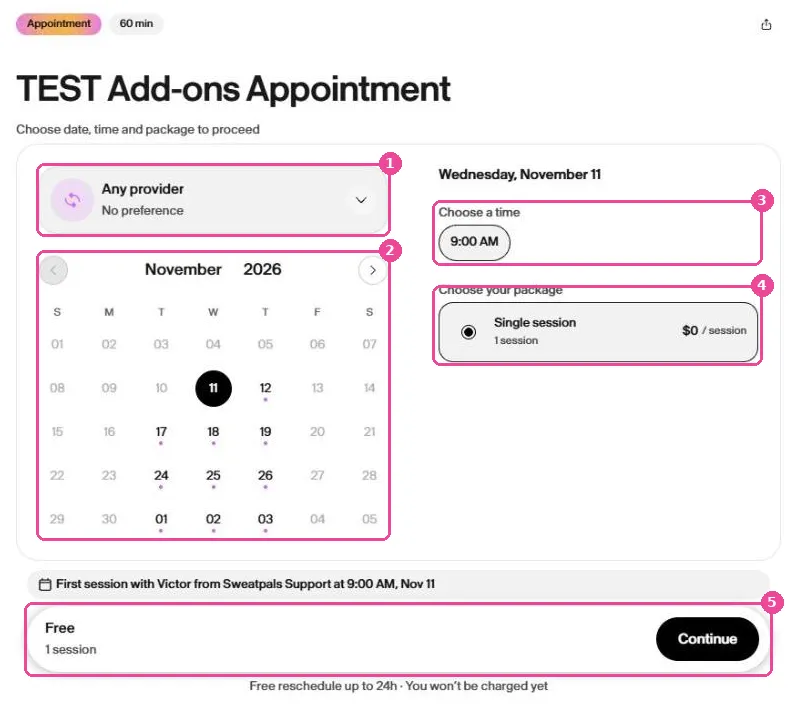
These steps are for the web. The Sweatpals app hasn't changed and still has its own booking flow.
If you have a Membership that allows for free/discounted appointment bookings, you'll be able to make use of those benefits during checkout.
When the appointment time comes, you'll then have your session with the professional you selected. If any issues arise, you'll be notified by the community host.
Membership Access
If you’re subscribed to a host’s membership, eligible events will show a “Book with Membership” option.
- Tap that button to reserve without additional payment.
- The session will count toward your included credits (if limited).
Not logged in? On the web, if the email or phone number you enter at checkout belongs to an account with a plan that covers the booking, you'll see Looks like you're a member. Click Log in, enter the verification code we send you, and you'll go back to checkout logged in, with your plan already applied. You can still continue as a guest if you prefer.