✉️ 7.1 Email & SMS Campaigns
Create, send, and analyze campaigns to engage your community
Overview
Sweatpals includes built‑in tools for communicating directly with your members through email and SMS campaigns. Campaigns are sent from your Host Dashboard and automatically reach members who have opted in to updates.
Understanding Campaigns
Audience Targeting
With Sweatpals' campaign tooling, you have the ability to further target your audience from the web browser. Use specific groups for higher open rates and less opt‑outs.
Audience Type | Description |
|---|---|
All Members | Everyone following your community |
Active Members | Current subscription holders |
Event Attendees | Registered for past or upcoming events |
Custom Group | Filtered by location or interest |
Please note: If you would like to import contracts from another platform, our Support team can assist with this process. You will need a CSV file with the following details:
- Name
- Marketing Opt-In Consent / Status
To do so, email [email protected] with the file.
Our team will also confirm that:
- All phone numbers in the file were collected directly via your website signup form, or from an identified 3P provider you can share the opt-in flow for.
- Users explicitly opted in to receive SMS communications related to your events (no pre-checked boxes or third-party lists).
- Consent records (e.g., timestamps and/or backend form logs) are retained and can be provided if needed.
- You ensure valid user consent was obtained and agree to indemnify and hold Sweatpals harmless from any claims, liabilities, or penalties arising from lack of consent or non-compliance with applicable SMS regulations.
Campaign Analytics
After sending, open the campaign to see:
Metric | Description |
|---|---|
Emails Delivered | Messages successfully sent |
Opens | Unique opens for email campaigns |
Clicks | Link clicks from email body |
SMS Delivery Rate | Confirmed carrier delivery |
Manual Campaigns
Creating Campaign via Web
- Open dashboard.sweatpals.com
- Select Email & SMS
- Click +Create
- Choose a channel: Email or SMS
- Draft & format your message as you wish
- Select your audience:
- Entire community - Sends the campaign to any opted-in members that follow your community page.
- Custom audience - Filters the audience with options including:
- Membership
- Location
- Events (w/ tier options)
- Classes (w/ tier options)
- Retreats (w/ tier options)
- Appointments
- Engagement type
- Choose delivery timing (Send now or Schedule)
- Click Send campaign
🚀 Good to know: If someone belongs to multiple audience segments selected for the same campaign, they will only receive one message. Sweatpals automatically removes duplicate recipients before sending.
Please note: Members who have opted-out of marketing campaigns will not receive your campaign. They can opt in/out at any time.
Creating Campaign via App
- Open Sweatpals from host mode (see: 🔄 1.3 Switching Between Profiles)
- Select the + icon
- Select Campaign
- Choose a channel: Email or SMS
- Draft & format your message as you wish
- Toggle on links to specific experiences
- Select your audience
- Click Send
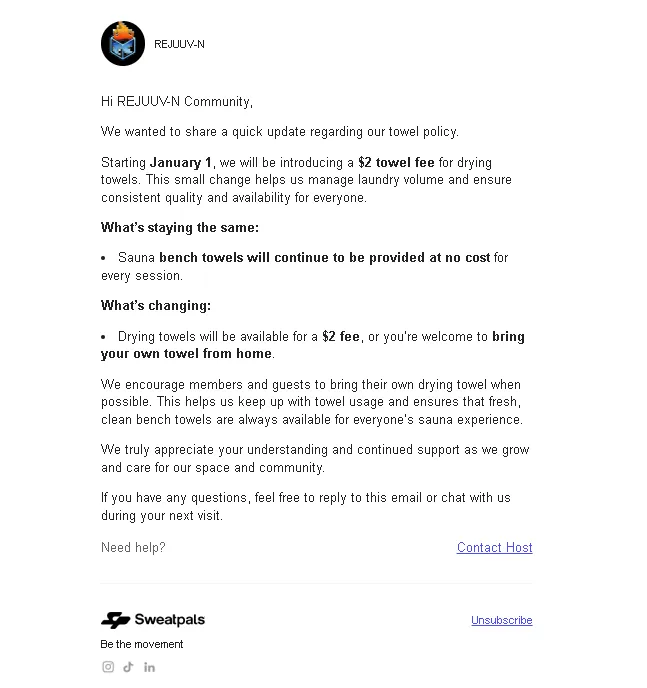
Example of Email Campaign
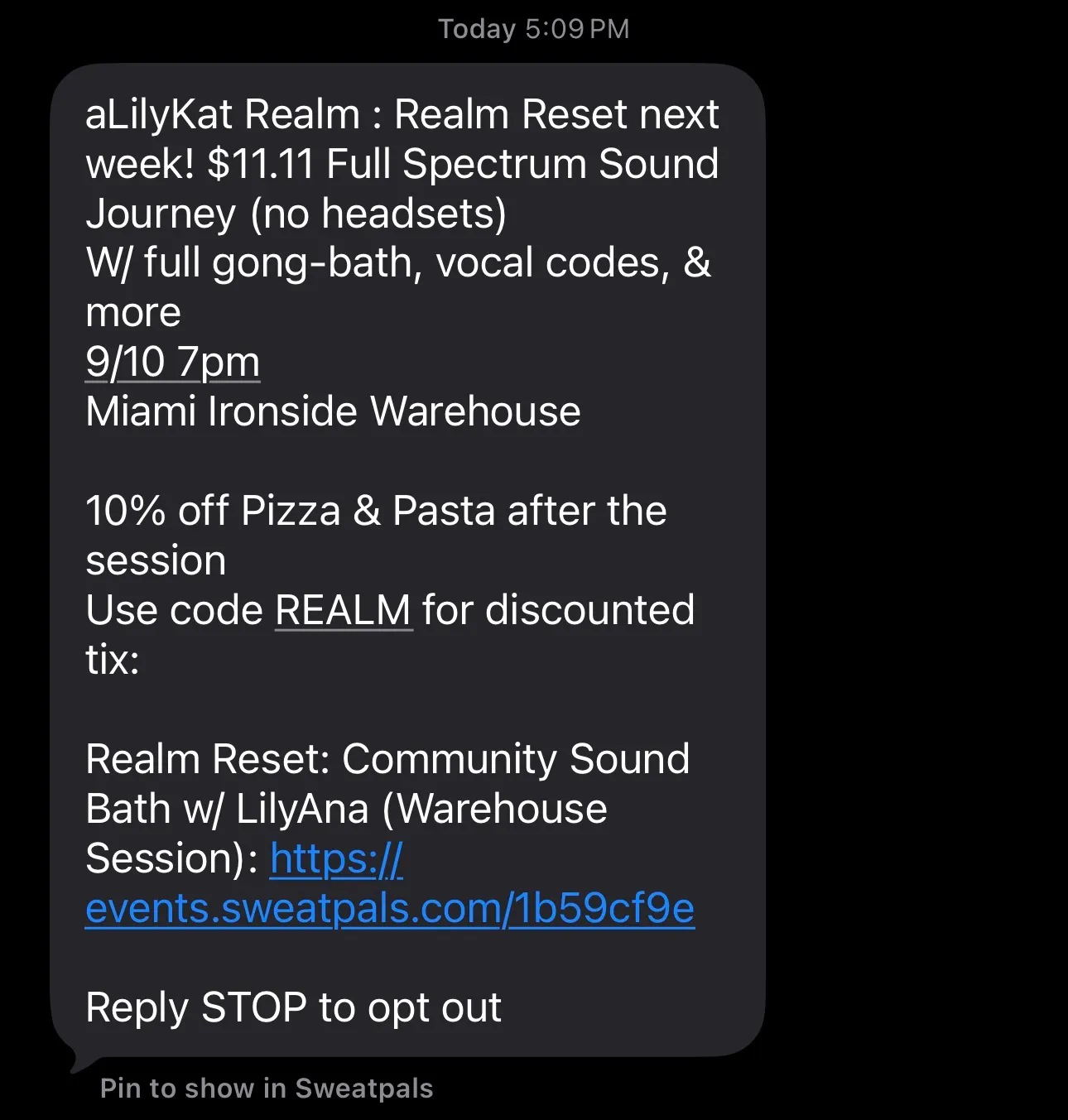
Example of SMS Campaign
Members Who Have Incomplete Profiles
To properly maintain communications with your community, your followers may need to keep their profiles up to date. If they're missing account information (like email or phone number), they may not receive your campaigns.
That's where the Profile Completion Email feature comes in. Simply:
- Head to the Members tab
- Find a follower who is missing information & click on the ••• menu button
- You'll find the option to send them a profile completion email in the drop-down menu
Troubleshooting
If you receive any reports from recipients letting you know that your campaign landed in their Spam inbox or was blocked, there's a couple pointers to keep in mind before trying again.
- Spam filters cannot read text inside of an image, so if your campaign only contains an image file, that's probably what's flagging the message in your recipient's inbox. Mixing text with images is one way to not get your campaign caught on filters.
- Run a test through mail-tester.com (free) — it scores your email and tells you exactly what's flagging.
Automated Campaigns
Automated campaigns allow you to customize the email messages that are automatically sent from your community when certain actions occur.
All automated announcements have disabled customization by default. To customize one, first enable it and then update the subject and message.
Please note: Automated campaigns are currently available for email only.
Available automated emails
Announcement | When it is sent |
|---|---|
Experience reminder | Sent to attendees before the experience starts |
Order confirmation | Sent after a ticket purchase is completed |
Ticket confirmation | Sent to each attendee with their individual ticket details |
Membership confirmation | Sent when a new membership subscription is activated |
Renewal membership reminder | Sent when a membership subscription is about to renew |
Membership cancelled | Sent when a membership subscription is cancelled |
Membership paused | Sent when a membership subscription is paused |
Membership renewal failed | Sent when a membership renewal payment fails |
Appointment reschedule confirmation | Sent to the client when their booking is rescheduled |
Customize an automated campaign
- Open dashboard.sweatpals.com
- Select Email & SMS
- Toggle into Automated Campaigns
- Select the automated campaign you want to customize using the ••• menu next to it
- Turn on the toggle to enable the customization
- Add/update the subject, message, & other variables
- Select Save
Please note: Within the Order Confirmation template and Membership Confirmation template, you also have the ability to edit the automated messages per-experience or per-membership.